


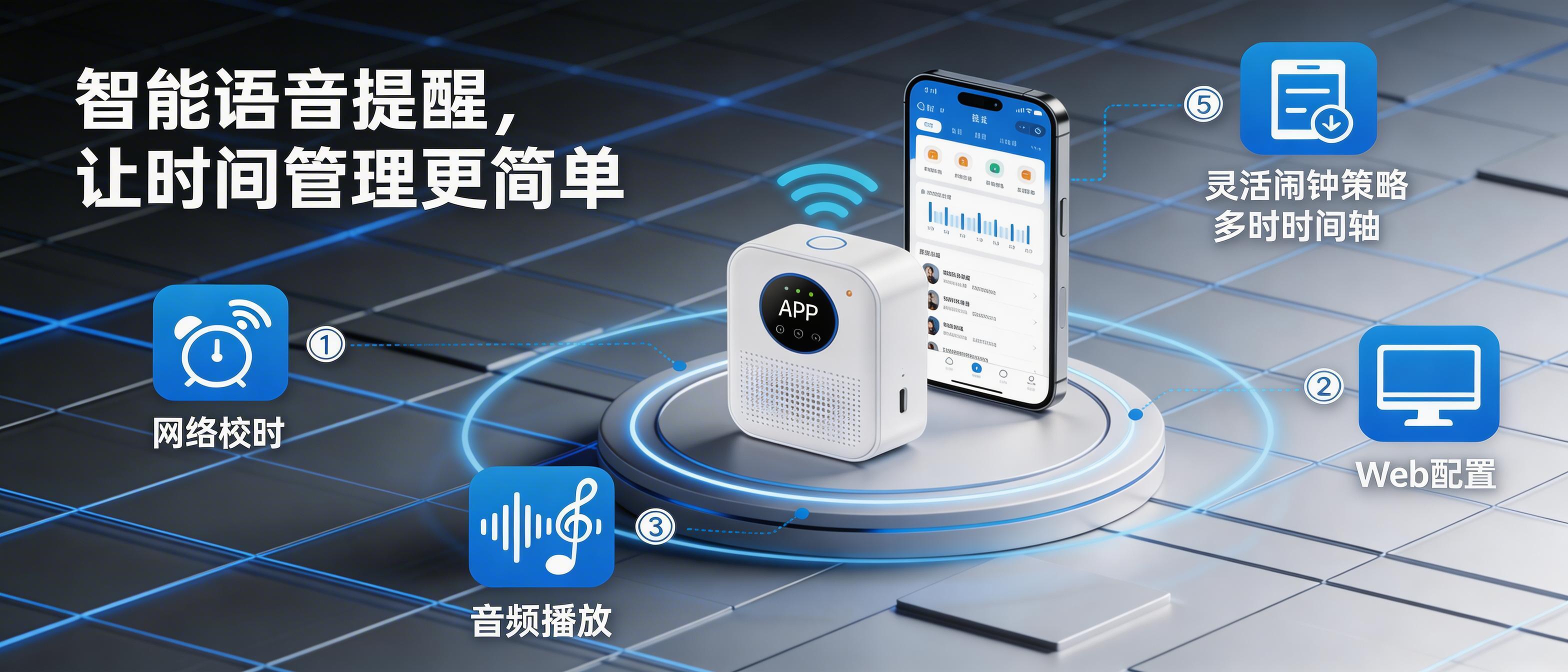
Connected Smart Timer and Voice Reminder Device Solution
- Bilingual time announcement (Chinese/English)
- Westminster chimes
- musical time signals
- at least 50 independent alarms
- statutory holidays/workdays and other modes
- USB drive/TF card ringtone playback
- single/loop/random playback modes
- Web configuration in Chinese/English/Japanese
- Solution Overview
- Hardware Design
- Interface Protocol
- Reference Design
- Manufacturing & Factory Test
- Functional Description
- FAQ
- Revision History
- Downloads
This solution centers on network time synchronization, flexible alarm strategies, audio playback, and Web configuration. It is feature-complete, easy to adopt, and simple to configure.
It is suitable for a wide range of scenarios that require “unified time management”, “scheduled reminders/bells”, or “time-slot-based voice broadcasting”.
Examples include:
① Schools / training institutions: class schedule bells, class change reminders, automatic adaptation to statutory holidays
② Factories / workshops: commute and shift bells, safety or production reminders at specific times
③ Hospitals / care facilities: nursing shift reminders, medication / activity reminders
④ Offices / retail stores: meeting, lunch break, and business-hours broadcasting
⑤ Others: exam bells, time-slot announcements in sports venues, worship reminders in religious venues, etc.
We provide core modules for customers who need secondary development at scale. Users can quickly design their own products based on the official solution, reducing cost and shortening the development cycle while maintaining complete functionality.
We also provide detailed technical support. For any questions, please call the phone number in the website footer or contact us via WeChat (iottimer-com).
Functional Topology Diagram
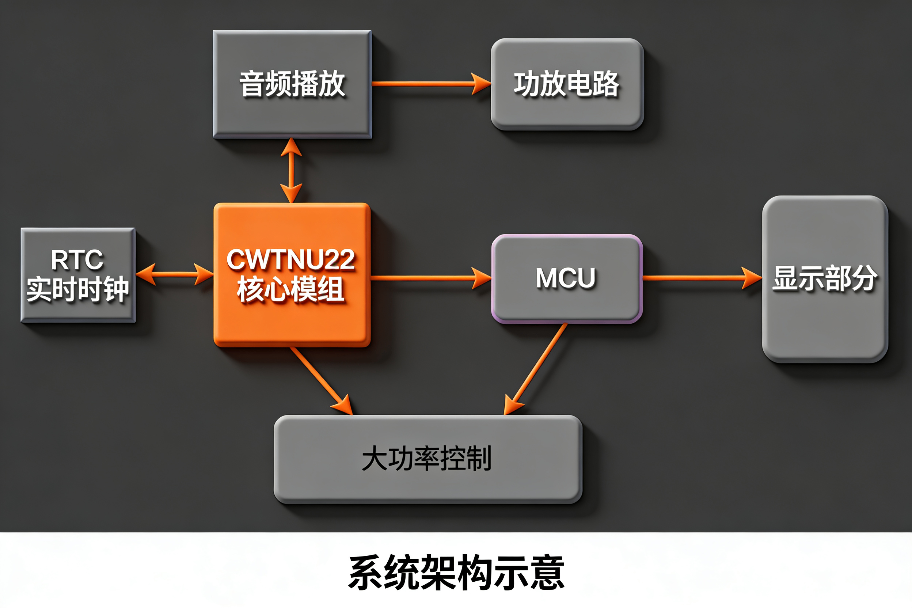
The overall product architecture is shown above.
The CWTNU22 core module handles complex functions such as network connection, NTP time synchronization, alarm and time-signal logic, and UART output.
Users only need to design the peripheral sections such as the audio power amplifier, display interface, and high-power control according to actual requirements to build a complete product quickly, greatly reducing development difficulty and cycle time.
Responsibility Allocation by Subsystem
- CWTNU22 Core Module: Provided by us. Responsible for core functions such as Wi-Fi networking, NTP time sync, alarm/time-signal strategies, ringtone scheduling, and UART protocol output.
- Audio Playback Section: Implemented with reference to the schematics, BOM, and reference design we provide. Includes audio decoding, DAC output, and related circuitry. Users can directly reuse or slightly adjust it.
- Power Amplifier Circuit: Designed by the user according to output power and application requirements, for example a built-in low-power amplifier or only line-level audio output for an external professional amplifier.
- RTC Real-Time Clock: Supports multiple common RTC chips. Users can select a model according to backup-time retention and accuracy requirements, and connect it to the core module over I2C.
- MCU + Display Section: User-defined. The MCU receives the core module’s UART protocol data at 4 frames per second, parses it, and drives an LCD/OLED/7-segment display to show time, alarm status, Wi-Fi icon, and other content.
- High-Power Control: Used to drive 220V external amplifiers, bells, lighting, and other high-power devices. The core module IO can directly output a control signal, or the user MCU can parse the protocol and implement more complex control logic.
Hardware Design Considerations
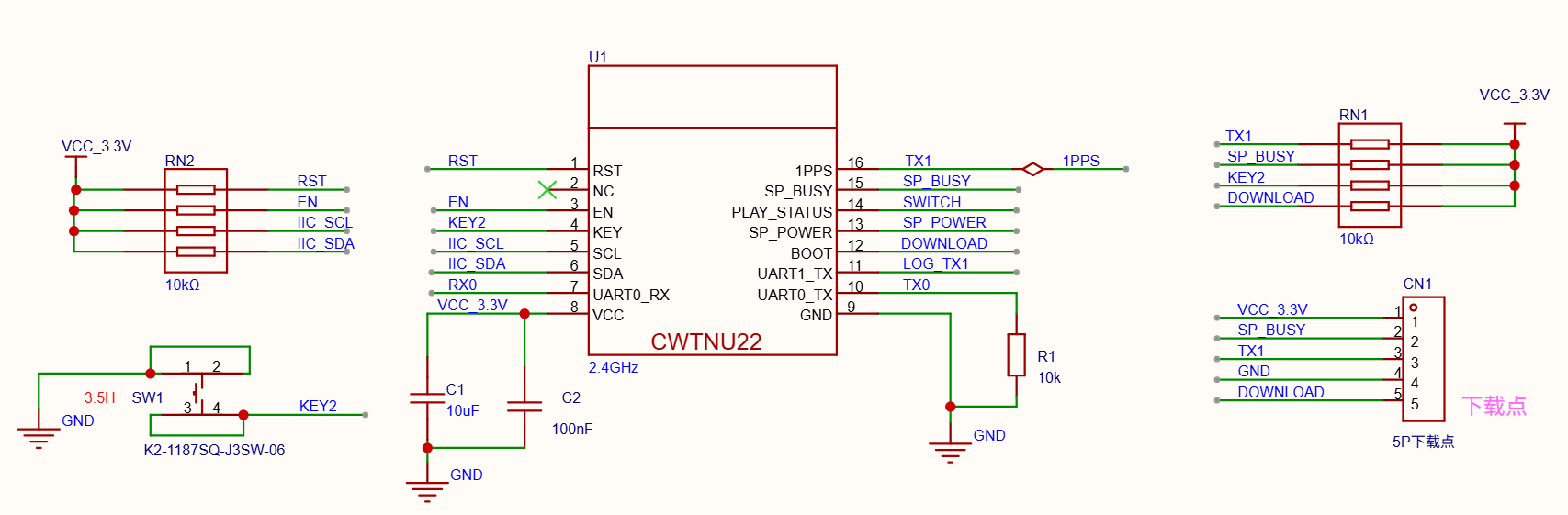
We provide a reference schematic for the CWTNU22 core module for use in secondary development. The key hardware design considerations are summarized below.
1. Power Supply Design
① Core module supply
-Recommended voltage: 3.3V (stable range 3.0V to 3.6V)
-Quiescent current: approximately below 20 mA
-Peak current: can reach 450 to 500 mA during Wi-Fi connection / data transfer (the power supply should provide at least 600 mA of margin to avoid disconnects or resets)
-Recommendation: use an LDO and place 10 uF + 0.1 uF decoupling capacitors close to the module.
② Audio playback section supply
-Supports 3.3V to 5V power supply
-When powered from 5V, add an M7 diode in series for voltage drop as shown in the core-board schematic to protect internal ICs
-Typical current: standby / system ringtone approximately 15 to 20 mA; with USB drive inserted approximately 40 to 60 mA
③ Power amplifier supply (user-designed)
-Amplifier ICs usually use 5V or higher voltage, for example the TPA31xx series commonly uses 5 to 24V
-Current demand is relatively high, from a few mA at mute to hundreds of mA or even several amperes at full power, so it should use an independent supply isolated from the core module to avoid noise coupling
-Recommendation: separate amplifier power from digital circuitry and use an inductor or LC filter to suppress high-frequency interference.
④ MCU section (user-designed)
A 3.3V MCU is recommended so that its UART voltage levels match the CWTNU22 core module directly, with no additional level shifter required.
The MCU mainly parses the core module’s UART protocol (115200 bps, 4 frames per second) and drives the display.
⑤ Other peripheral supplies (user-designed)
-Display panel (TFT / OLED / 7-segment, etc.): estimate current based on the selected panel and reserve 30% to 50% margin.
-High-power control (relays / external amplifiers, etc.): current variation may be large, so use an independent supply with sufficient margin to avoid voltage drop or overload.
-Overall recommendation: use a single input with multiple regulated rails and reserve adequate power margin according to the actual design to ensure stable operation.
2. Peripheral Circuitry of the Core Module
| No. | Name | Function | Description |
|---|---|---|---|
1 | RST | Reset | Active-low reset. Must remain high during power-up. |
2 | NC | Leave floating, do not connect | |
3 | EN | Enable | High level for normal operation. Must remain high during power-up. |
4 | KEY | Key input | Active low: long press to enter network configuration mode, short press once for voice time announcement, hold during power-up to enter factory test mode |
5 | SCL | I2C clock | Connect to the RTC chip. Requires an external 10k ohm pull-up resistor |
6 | SDA | I2C data | Connect to the RTC chip. Requires an external 10k ohm pull-up resistor |
7 | UART0_RX | UART0 receive | Connect to the music decoder module TX pin |
8 | VCC | Power positive | 3.3V supply |
9 | GND | Power negative | |
10 | UART0_TX | UART0 transmit | Connect to the music decoder module RX pin. Must remain low during power-up |
11 | UART1_TX | UART1 transmit | Connect to the user MCU UART RX. Used to send time, alarm, and status data. Must remain high during power-up |
12 | BOOT | Programming control | Must remain high during power-up for normal boot |
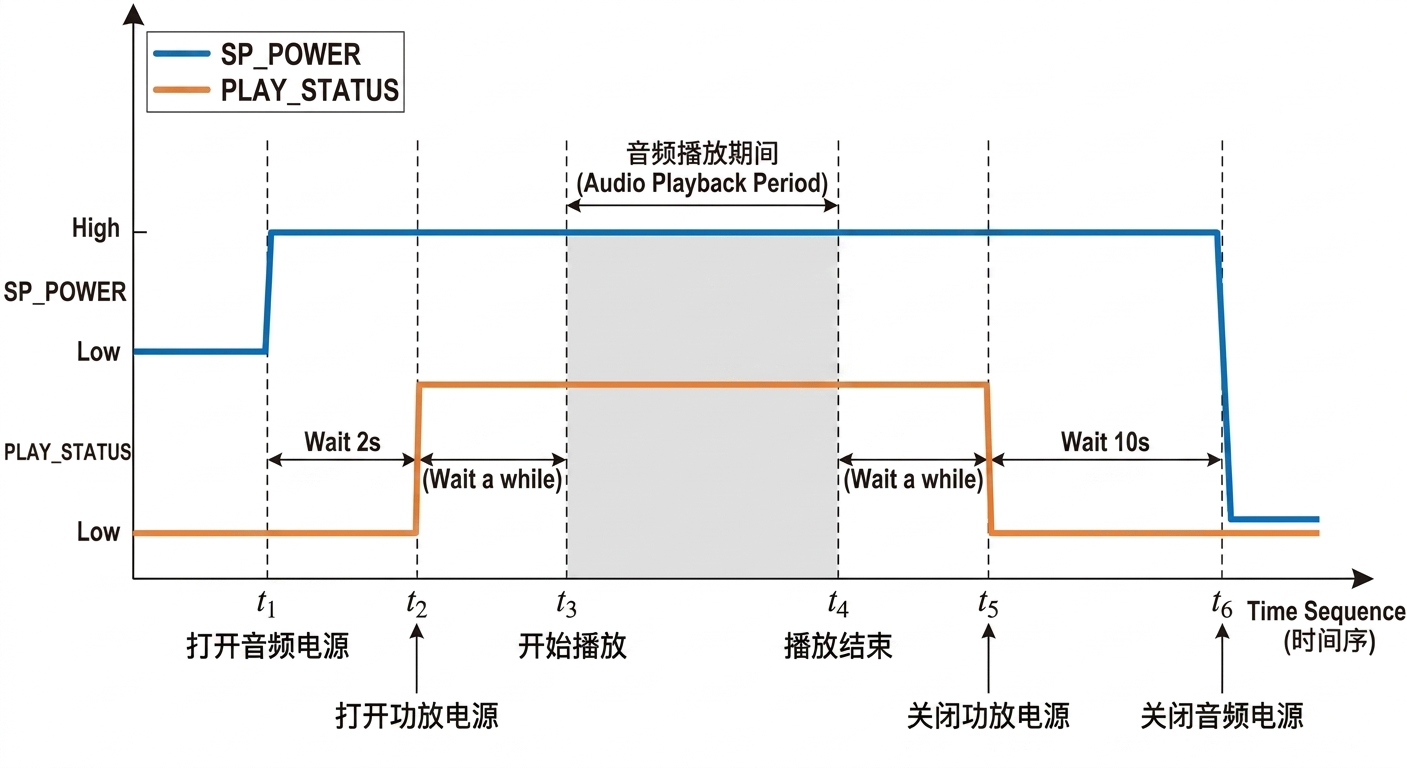
13 | SP_POWER | Audio power control | Outputs high when audio is playing to control power to the audio circuitry |
14 | PLAY_STATUS | Playback status output | Outputs high during playback and can be used to control an external amplifier |
15 | SP_BUSY | Playback busy detect input | Connect to the BUSY pin of the audio playback chip to determine whether playback is in progress |
16 | 1PPS | Second pulse output | Outputs one rising edge every second, high pulse width approximately 100 ms, for precise time synchronization |
| No. | Name | Power-up level |
|---|---|---|
1 | RST | High |
3 | EN | High |
10 | UART0_TXID | Low |
11 | UART1_TXID | High |
12 | BOOT | High |
Please refer to the schematic for the core module design and pay special attention to the required power-up logic levels.
UART1_TXID (pin 11) connects to the external MCU and must be held at a high level after power-up.
Most MCU GPIO pins are floating inputs during the early power-up stage and usually power up and initialize before the module. To avoid abnormal startup caused by the module sampling a low level by mistake, we strongly recommend:
-adding a 10k ohm pull-up resistor from the module-side UART1_TXID pin to 3.3V
-ensuring that the MCU firmware does not configure the corresponding pin as a low-level output during initialization
3. Music Decoder Reference Circuit
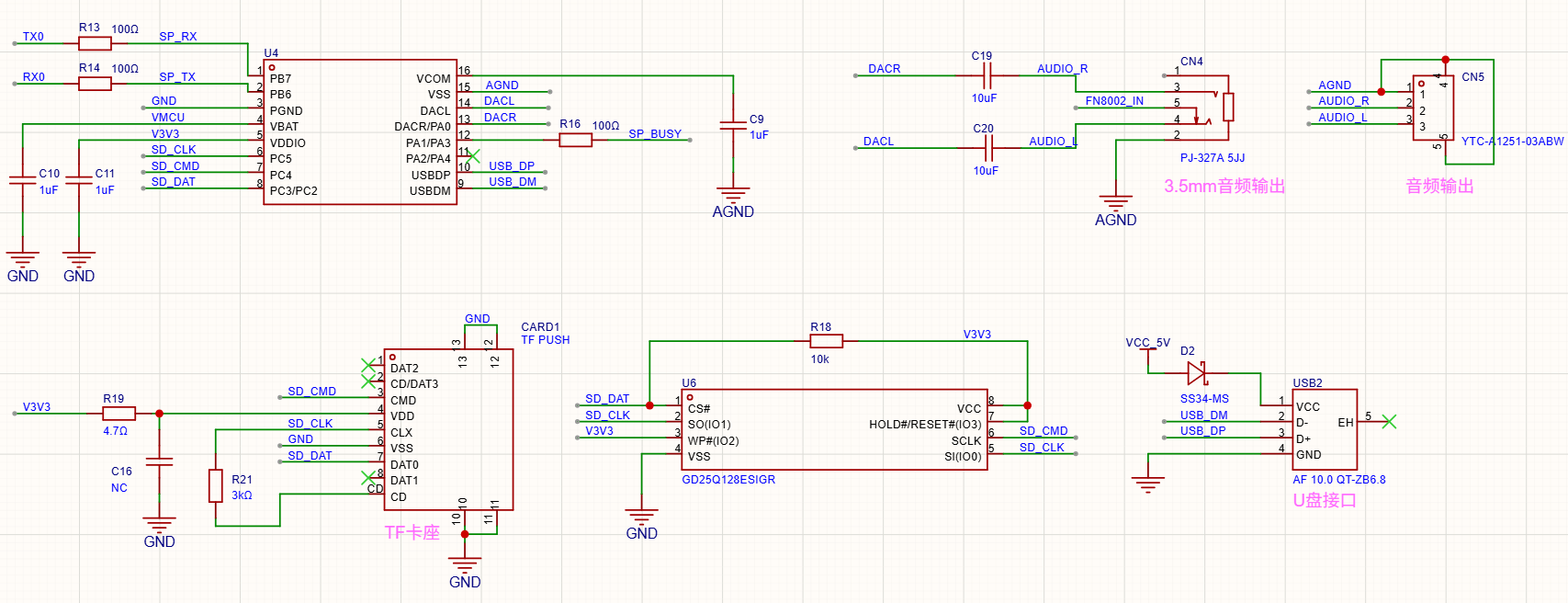
The music decoder section uses the KT404C chip.
The schematic shows the basic peripheral circuitry of the music chip, audio output, TF card socket, USB interface (supports USB drive playback), and the Flash memory circuit used to store system audio parameters.
Please refer to the download links at the bottom of this page for the full schematic and the KT404C datasheet.
During PCB layout, pay special attention to making the USB signal traces differential and length-matched.
This chip supports stereo output through DACL (left channel) and DACR (right channel).
The Flash model is 25Q128 and firmware must be programmed before mass production (firmware will be provided later).
Although it is compatible with most 25Q128 variants, to reduce risk we recommend prioritizing the vendor/model used during development verification. If the Flash manufacturer is changed, full verification must be completed before mass production.
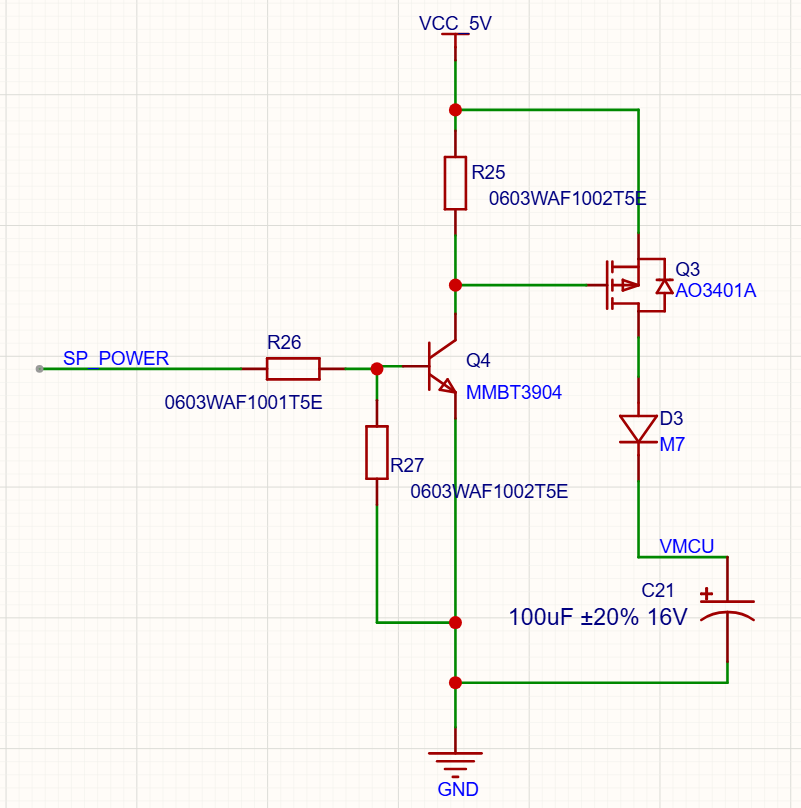
To improve system stability, prevent the music chip from locking up abnormally, and effectively reduce standby power consumption, we recommend the power-control scheme shown above: power the music decoder circuit only when audio playback is required. We strongly recommend keeping this power-control section in the product design.
4. Audio Power Amplifier Circuit
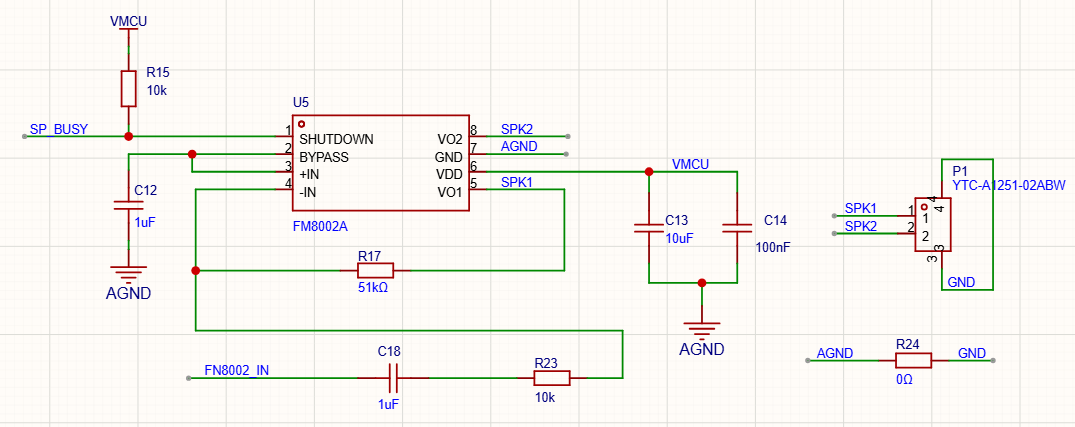
The example uses the 8002 audio power amplifier IC. Users may omit or redesign the amplifier section according to actual requirements.
The music chip outputs stereo signals. If a mono amplifier IC is used, it is recommended to mix the left and right channels through an RC network before feeding the amplifier input.
In the example, the amplifier on/off control is implemented using the core module’s SP_POWER pin together with the SP_BUSY signal from the music chip.
When the amplifier power is relatively large, it is recommended to use the core module’s PLAY_STATUS pin to control amplifier enable.
5. RTC Real-Time Clock
The supported RTC models and their key characteristics are compared below:
| No. | RTC Model | Crystal Type | Rate Compensation | Notes / Selection Advice |
|---|---|---|---|---|
1 | BL5372 | External crystal | Supported | Default model used on the core board. Low power consumption and supports digital calibration. Crystal and load capacitor matching must be handled carefully to ensure accuracy |
2 | RS5C372 | External crystal | Supported | Pin-to-pin and register compatible with BL5372 and can be substituted directly |
3 | BM8563 | External crystal | Not supported | Good cost-performance and low power consumption. Crystal and load capacitor matching are required, and accuracy depends on peripheral tuning |
4 | RX8010 | Built-in crystal | Not supported | No external crystal required and no tuning needed. Officially rated at about plus or minus 1 minute per month at 25 degrees C, suitable for simplified designs |
5 | RX8025 | Built-in crystal | Not supported | A popular market model with very low power consumption, but refurbished / counterfeit parts are relatively common, so use reputable procurement channels and verify authenticity |
6. MCU + Display Section
This section’s hardware and firmware are designed by the user according to the actual product requirements, for example:
-Use a 7-segment LED display to show time, status, alarm count, and related information;
-Use a character or graphic LCD panel (LCD / OLED / TFT, etc.) for a richer UI;
-Or use other custom display approaches.
The MCU receives status, playback, time, and other data sent from the CWTNU22 core module over UART, parses the protocol packets, and drives the corresponding display hardware for real-time updates.
A 3.3V operating voltage is recommended for the MCU so that its IO levels fully match the CWTNU22 core module and avoid the added cost and potential issues of level-shifting circuitry.
We also provide a matching LCD display module solution, including detailed hardware schematics and sample reference firmware.
Customers can refer to the protocol parsing and handling logic in the sample program to shorten development time.
Note: the sample program is for reference only.
INFO Output Interface
The CWTNU22 core module transmits related information through the UART interface (UART1_TX). The UART parameters are currently fixed and cannot be changed.
This interface is mainly used to extend display functionality and can output time, alarm status, and related data. The system can still operate normally even if this interface is not used.
1. UART Parameters
- Baud rate: 115200
- Parity: None
- Data bits: 8 bit
- Stop bits: 1 bit
- Inter-frame interval: 100 ms
- Transmission period: 1 second
- Maximum frame length: 200 bytes
2. Communication Frame Format
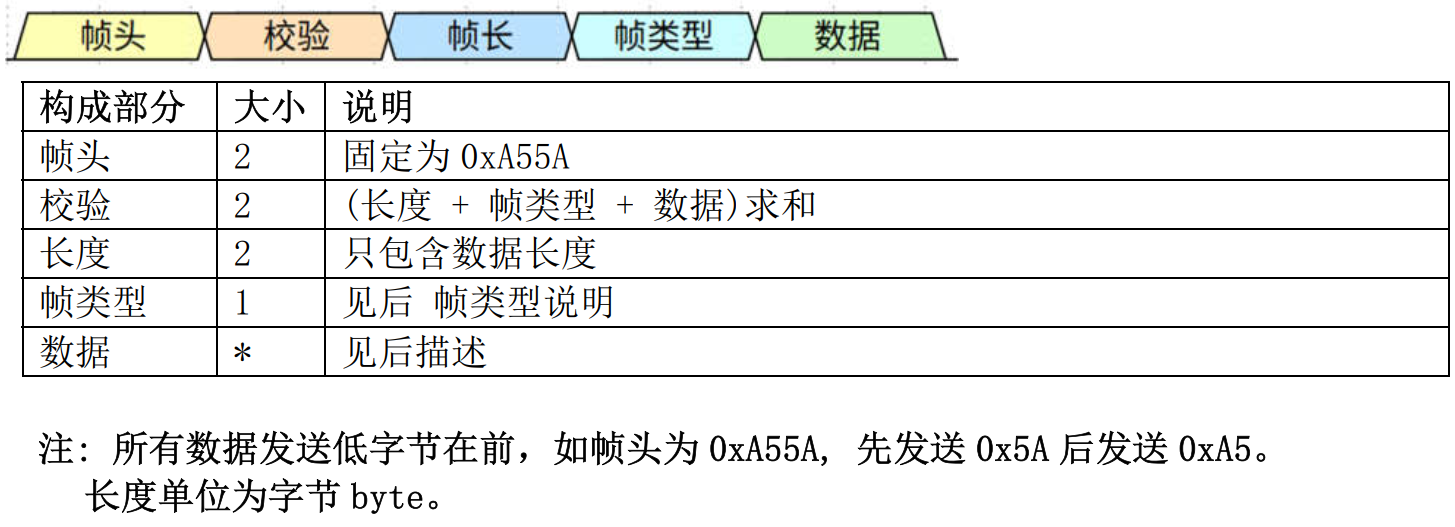
3. Frame Type Description
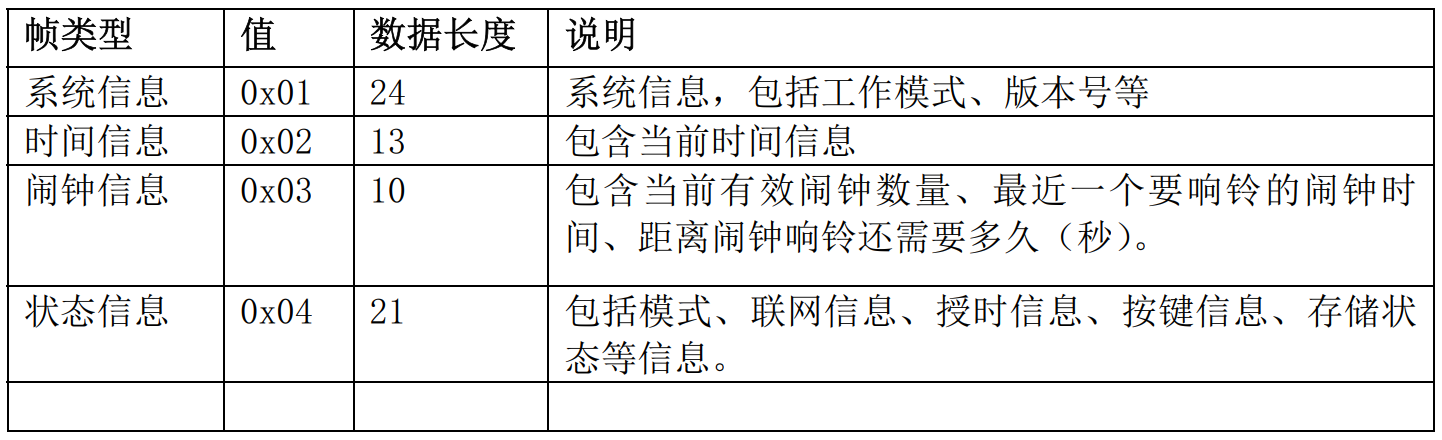
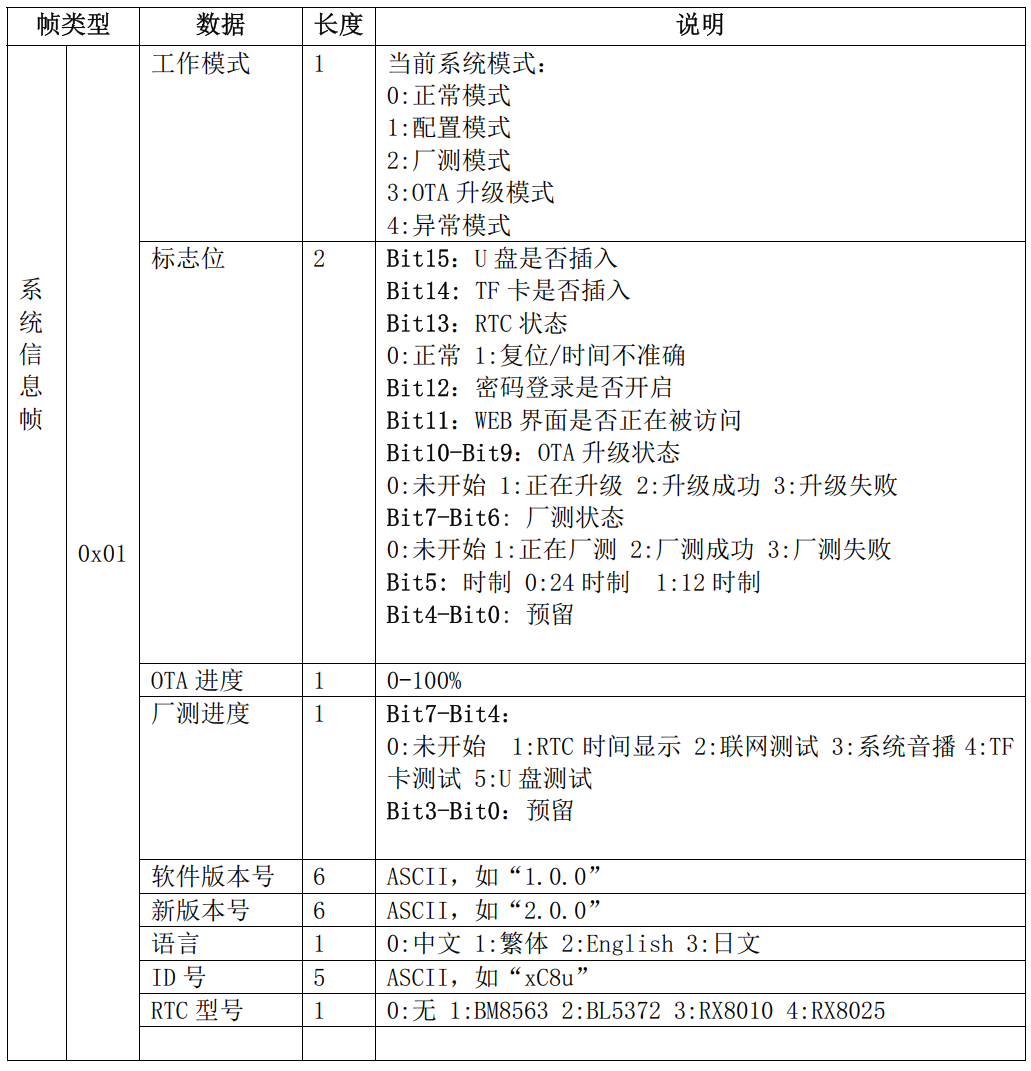
4. System Information Frame
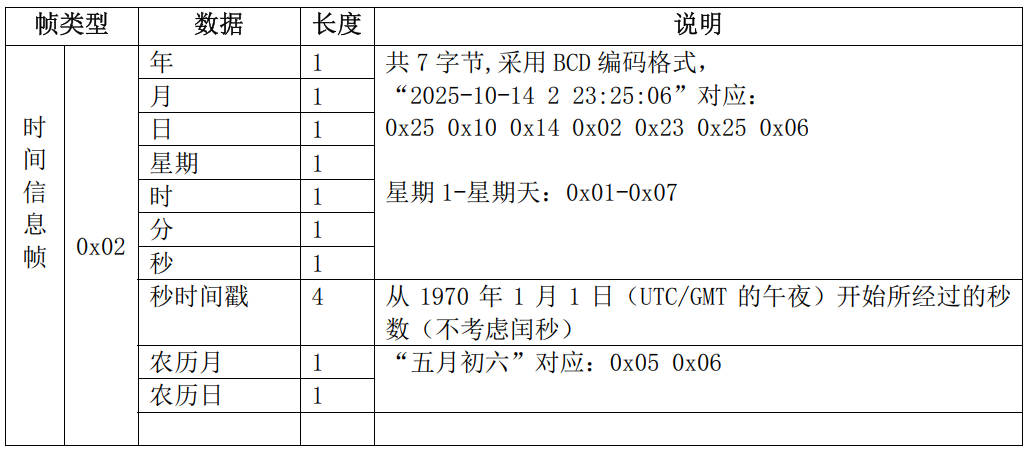
5. Time Information Frame
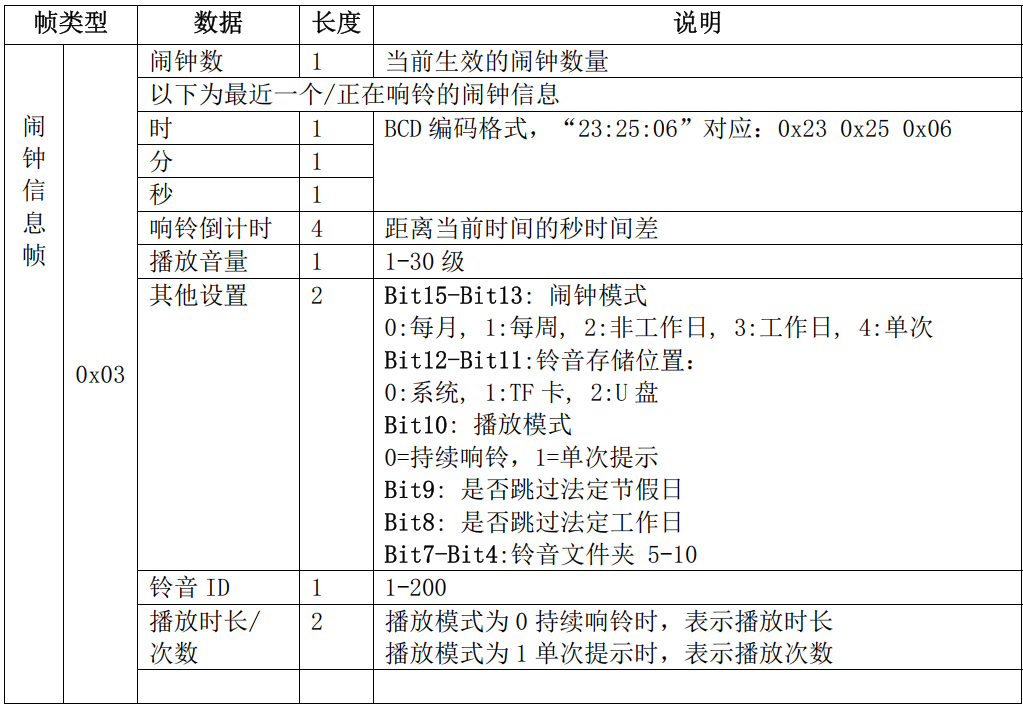
6. Alarm Information Frame
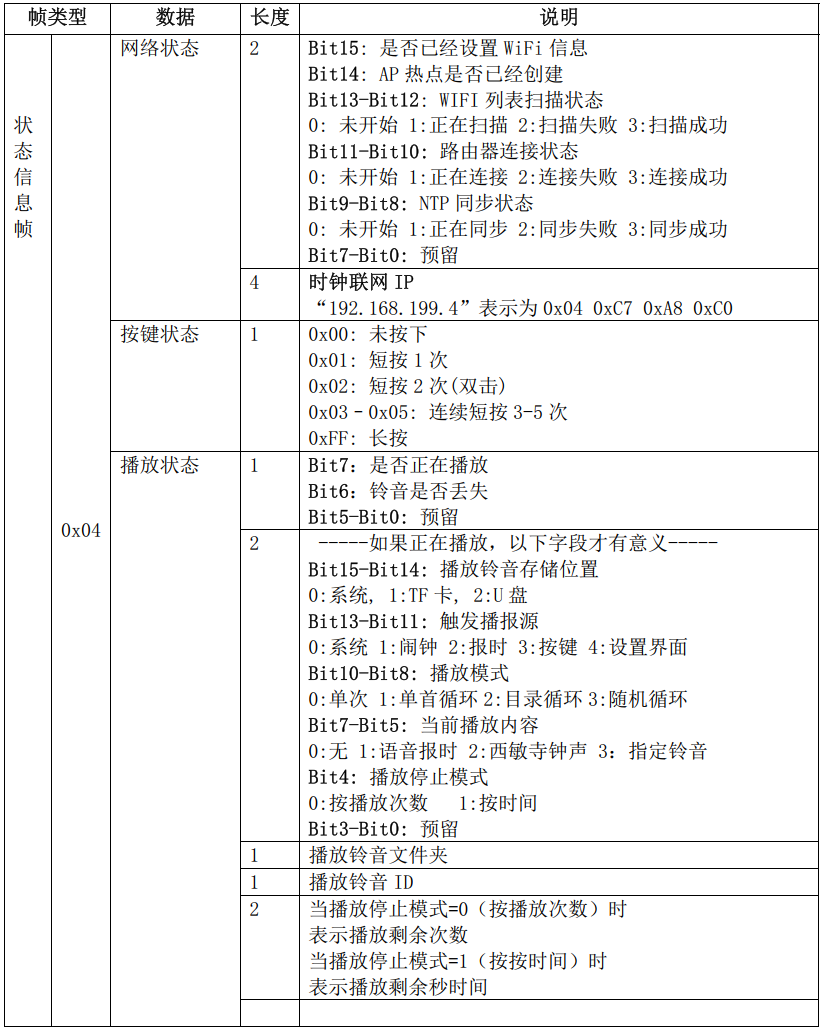
7. Status Information Frame
8. Transmission Timing
- Starting at millisecond 0 of every second, 4 frames are sent consecutively in a fixed order (time information frame, status information frame, system information frame, alarm information frame)
- Interval between frames is approximately 100 ms
- The receiver must satisfy: total time for a single frame (receive + parse + process) < 100 ms - frame duration itself
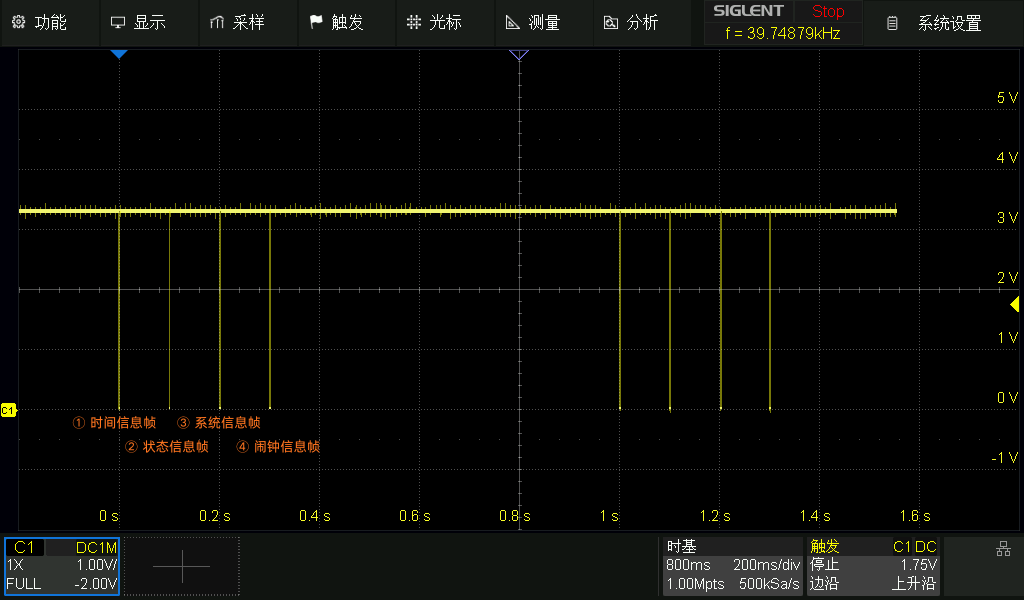
9. Example Frame Data
1. Time information frame: 5A A5 07 03 0D 00 02 26 02 25 03 17 22 47 E7 2F 9F 69 01 09
- Checksum: 0x0307
- Length: 0x000D
- Frame type: 0x02
- BCD time: 26 02 25 03 17 22 47 means 2026-02-25 Wed 17:22:47
- Timestamp: 0x699F2FE7 corresponds to 1772040167
- Lunar calendar: 01 09 corresponds to the ninth day of the first lunar month
2. Status information frame: 5A A5 CF 03 0E 00 04 00 8F C0 A8 C7 9F 00 00 00 60 00 00 00 00
- Checksum: 0x03CF
- Length: 0x000E
- Frame type: 0x04
- Network status 1: 0x8F00: Wi-Fi configured, AP hotspot not created, Wi-Fi not scanning, router connected successfully, NTP synchronization successful
- Network status 2: 0x9FC7A8C0 corresponds to IP 192.168.199.159
- Key status: 0x00 not pressed
- Playback status 1: 0x00 no playback, ringtone not missing
- Playback status 2: 0x6000 meaningless when not playing
- Playback status 3: 0x00 meaningless when not playing
- Playback status 4: 0x00 meaningless when not playing
- Playback status 5: 0x0000 meaningless when not playing
3. System information frame: 5A A5 79 02 17 00 01 00 00 40 00 00 30 2E 31 2E 31 00 00 00 00 00 00 00 00 61 33 65 39 00 00
- Checksum: 0x0279
- Length: 0x0018
- Frame type: 0x01
- Operating mode: 0x00: normal mode
- Flag (USB drive): 0x4000 & 0x8000: not inserted
- Flag (TF card): 0x4000 & 0x4000: inserted
- Flag (RTC status): 0x4000 & 0x2000: normal
- Flag (secure login): 0x4000 & 0x1000: disabled
- Flag (settings page access): 0x4000 & 0x0800: not currently being accessed
- Flag (OTA status): 0x4000 & 0x0600: not started
- Flag (factory test status): 0x4000 & 0x00C0: not started
- Flag (time format): 0x4000 & 0x0020: 24-hour format
- OTA progress: 0x00: meaningful only when operating mode == 3
- Factory test progress: 0x00: meaningful only when operating mode == 2
- Software version: 30 2E 31 2E 31 00 corresponds to 0.1.1
- New version: 00 00 00 00 00 00 no new version
- Language: 0x00 Simplified Chinese
- ID: 61 33 65 39 00 corresponds to a3e9
- RTC model: 0x00 no RTC
4. Alarm information frame: 5A A5 98 01 0E 00 03 13 22 45 00 84 4B 00 00 11 00 24 08 01 00
- Checksum: 0x0198
- Length: 0x000E
- Frame type: 0x03
- Alarm count: 0x13: currently 19 valid alarms
- Next alarm time: 22 45 00 corresponds to 22:45:00
- Countdown to ring: 0x00004B84 means the alarm will ring in 19332 seconds
- Playback volume: 0x11: volume level 17
- Other settings (alarm mode): 0x2400 & 0xE000 weekly
- Other settings (ringtone storage): 0x2400 & 0x1800 system ringtone
- Other settings (playback mode): 0x2400 & 0x0400 single reminder
- Other settings (skip statutory holidays): 0x2400 & 0x0200 do not skip
- Other settings (skip statutory workdays): 0x2400 & 0x0100 do not skip
- Other settings (ringtone folder number): 0x2400 & 0x00F0 meaningful only when playing a ringtone from TF / USB storage
- Ringtone ID: 08 meaningful only when playing a ringtone from TF / USB storage
- Playback count / duration: 0x0001 play once
We provide two functional boards (the music alarm clock core board and the CWTNU22 evaluation board) plus one display module. Details are described below.
The design materials on this page are provided only for user reference and learning, with the goal of helping users get started quickly and carry out secondary development.
1. Music Alarm Clock Core Board
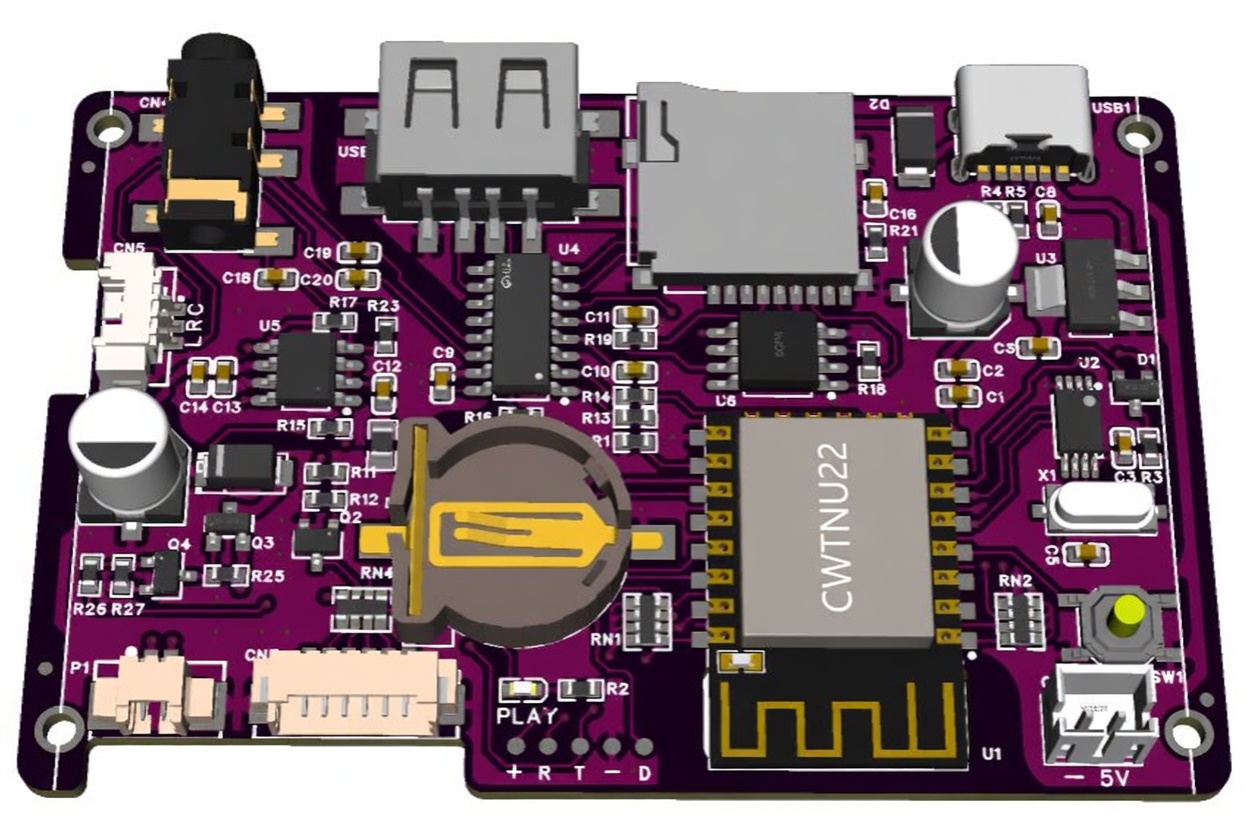
Reference design files: (see the Downloads tab)
-Schematic
-Complete project (LCSC EDA project)
If you need package libraries or the BOM, please export them from the project yourself.
2. CWTNU22 Evaluation Board
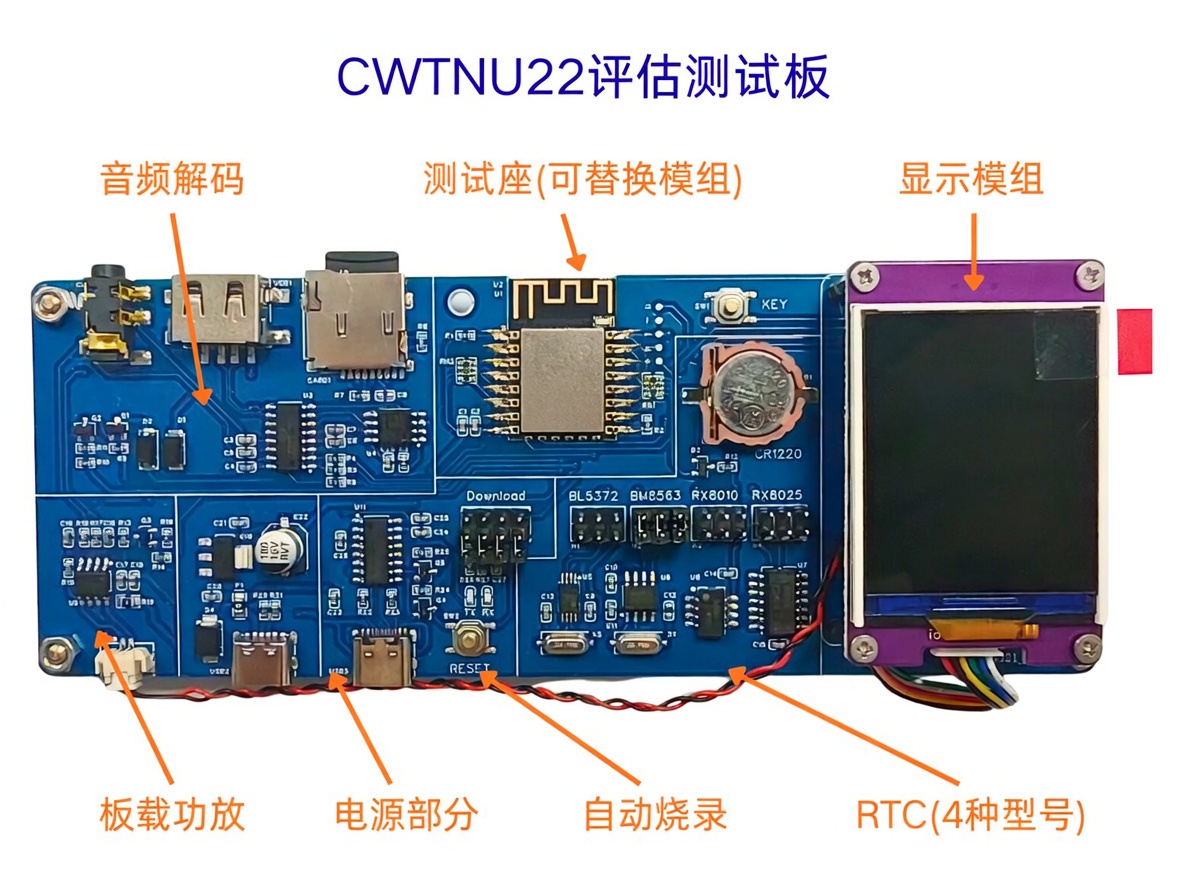
The evaluation board follows the functional topology diagram in the solution overview to partition the hardware layout, making it easier to understand the role of each circuit section.
Main characteristics:
① Test socket design: The evaluation board uses a castellated pogo-pin socket so that the core module can be replaced quickly for functional verification.
② Multi-RTC support: Four RTC models are supported on the board and selected through jumpers, which is convenient for evaluating different RTC options.
③ Programming support: A built-in Type-C programming interface allows firmware to be flashed to the core module directly.
Notes:
① Programming jumpers: The auto-programming circuit uses four jumpers. Remove all of them after programming is complete so other functions are not affected.
② RTC selection jumpers: The RTC section has four pin headers corresponding to four RTC models (see the board silkscreen). Only one RTC option may be selected at a time.
Reference design files: (see the Downloads tab)
-Schematic
3. Display Module (1.77-inch LCD)

We provide a 1.77-inch TFT LCD display module (128 x 160 resolution, ST7735 driver) using the GD32E230F8P6TR MCU.
It can be used together with the CWTNU22 core board to display time, alarms, and other basic information.
Functional Overview
- Displayed content: Date, time, alarm count, Wi-Fi status, playback status, alarm countdown, etc.
- Supported languages: Automatically switches among Chinese, English, and Japanese according to the system language setting
- Display themes: Supports 8 theme color schemes
- Button SW1: Short press to cycle display brightness
- Button SW2: Short press to show LAN IP, double-click to switch display theme
Reference design files: (see the Downloads tab)
-Schematic
-LCD module reference code
1. Manufacturing Notes
1.1 Component procurement
-CWTNU22 core module:
The latest version is shipped by default (see the revision history for software changes). If you need an older specified version, please confirm with us in advance. The current software version can be checked on the [Info & Upgrade] page.
-KT404C music decoder chip:
When purchasing, be sure to confirm the chip’s check code with the supplier. The currently recommended / verified check code is 2CFE. Different batches or manufacturers may vary, and using a non-matching check code may cause abnormal music playback.
-25Q128 Flash chip:
We strongly recommend prioritizing the exact vendor and model used during development verification, such as common brands like Winbond or Macronix. If a different vendor must be used, complete thorough functional validation first, including firmware programming and music playback stability, before moving to volume procurement and production, in order to avoid compatibility risks.
1.2 Production preparation
-Programming the 25Q128:
Use a programmer to flash the audio firmware (see Downloads) into the Flash chip before SMT assembly.
The audio firmware size is close to 16M, so a programmer based on the CH347 chip is recommended. For large quantities, using a professional programming service is recommended.
2. Factory Test Procedure
2.1 Functions to be tested
After product assembly is complete, a factory functional test is required to ensure that all core modules are working properly. The main verification items are:
-Display function: after power-on, check whether the screen lights normally, whether the display is clear and complete, and whether there are obvious dead pixels or abnormal behavior.
-Networking: verify whether the Wi-Fi RF performance of the core module is normal. (Note: the module itself is 100% tested before shipment, but complete-product retesting is still required to guard against assembly or process issues.)
-RTC real-time clock (if the product includes this function): after power-off, verify whether timekeeping continues; after power-up, check whether time retention and reading are correct.
-Audio and storage related functions:
-Test whether the speaker / audio output can produce sound normally
-Verify that system ringtones and prompts can be played normally
-Check whether the TF card reader circuit works properly (recognized and able to play)
-Check whether the USB circuit works properly (USB drive recognized and able to play)
2.2 Preparation for factory test
① Wi-Fi (2.4G) test preparation:
-SSID: “iottimer”
-Password: “12345678”
A guest Wi-Fi hotspot on a router is recommended where possible, because phone hotspots usually support fewer clients and are less stable.
② TF card preparation:
Create a folder named “10” in the root directory of the TF card, and place audio files named in the form “001_xx” inside it (at least one file beginning with 001 is required).
③ USB drive preparation:
Create a folder named “10” in the root directory of the USB drive, and place audio files named in the form “001_xx” inside it (using content different from the TF card is recommended so playback can be distinguished easily).
2.3 Recommended factory test flow
① Insert the TF card and USB drive into their corresponding connectors.
② Hold the function key and power on the product:
-The device enters factory test mode
-The system voice prompt announces: “All parameters have been restored to factory defaults”
-All parameters are now reset to factory defaults.
③ Short press the function key again to enter “network test”:
-The device automatically connects to the “iottimer” hotspot and performs NTP network time synchronization
-After synchronization succeeds, the time is written to the RTC
-Both success and failure are reported through voice prompts
④ Short press the function key again to enter “TF card playback test”:
-The device automatically plays the “001_xx” audio in folder “10” on the TF card
⑤ Short press the function key again to enter “USB drive playback test”:
-The device automatically plays the “001_xx” audio in folder “10” on the USB drive
⑥ Power off, wait for a period of time, then power on again to verify whether timekeeping is normal:
Skip this step if the product does not use an RTC
-You can short press the key to hear the voice time announcement or check the current time on the display
-This is used to verify RTC backup retention and timekeeping accuracy
-Recommended power-off duration:
• To verify only whether time is retained: power off for at least 1 minute
• To verify external-crystal timekeeping accuracy: power off for at least 24 hours
Notes:
-The factory test flow supports interruption by power-off. For example, if only factory reset is needed, power can be removed after the voice prompt is heard.
-The status of each step in the factory test is output through the system information frame. The client can parse it and present the corresponding state or prompt on the display.
Checklist of Verification Items for Each Factory Test Step
| Step | Test Item | Verified Function | Expected Normal Result | Abnormal Result | Notes |
|---|---|---|---|---|---|
② | Restore system parameters to factory defaults | Key trigger, voice announcement | Enters factory test mode correctly and announces “All parameters have been restored to factory defaults” | Cannot enter factory test mode / no voice announcement | |
③ | Network time sync | Core module networking, NTP sync, voice prompt | Connects successfully and announces successful synchronization | Sync failure / no voice prompt | Depends on 2.4G Wi-Fi and hotspot availability |
④ | TF card read and audio playback | TF card detection, audio decode/playback | Plays the audio file numbered 001 normally | Cannot play / no sound | |
⑤ | USB interface and USB playback | USB drive detection, audio playback | Plays the USB drive audio file numbered 001 normally | Cannot play / no sound | Using different content from the TF card is recommended to distinguish them |
⑥ | RTC time retention and rate | RTC backup retention, time readback, timekeeping accuracy | Time remains correct after power-off and continues running | Time lost after power-off / incorrect time | Can be skipped for products without RTC; rate verification requires a longer power-off interval |
Feature List
1. Network & Time Sync
- Wi-Fi time synchronization: Auto sync interval (1m / 5m / 1h / 24h / Off)
- Supports primary and backup NTP server addresses (user-defined)
- Professional NTP client algorithm with configurable network delay filtering threshold
- Supports global time zones and configurable automatic DST
- Supports OTA remote online upgrade
- Built-in WEB configuration interface accessible through LAN IP, with optional access password
- Supports DHCP and static IP settings
- Supports changing its own MAC address
2. Alarm
- At least 50 independent alarms can be configured
- Built-in multiple ringtones with 30 volume levels
- Supports USB drive / TF card ringtone playback
- Supports multiple alarm modes: one-time / weekly / monthly / statutory workdays / statutory holidays
- Playback modes support specific ringtone / random single track / folder loop / folder random
- Playback duration / playback count / effective time can be configured
- The statutory holidays list is fetched automatically from the network (supports China and Japan regions) and also supports user customization
3. Time Signal
- Hourly / half-hour / 15-minute / 45-minute announcements, with separate modes for each
- Time-signal modes support voice announcement / Westminster chime / custom ringtone
- Voice announcements support voice selection (Chinese x2, English x1) and 12/24-hour formats
- Time-signal schedules support fixed time-point plans and weekly plans, with optional holiday skip rules
- Supports prompt-tone settings before the formal announcement
- Supports 30 independent volume levels
4. Other Functions
- The settings interface supports Simplified Chinese / Traditional Chinese / English / Japanese
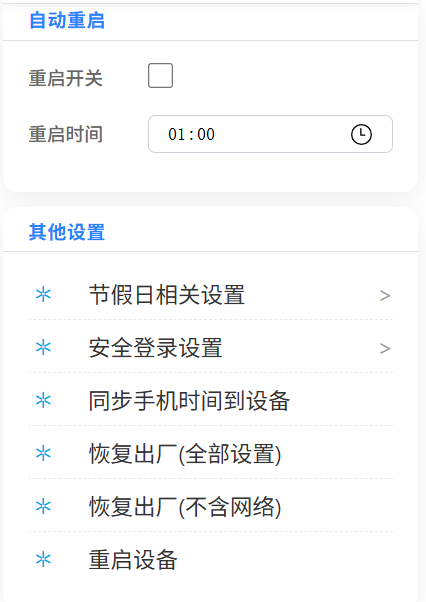
- Supports automatic reboot with configurable reboot time
- Can synchronize phone or computer time to the clock
- RTC hardware offset compensation can be configured (supported when the RTC model is BL5372T)
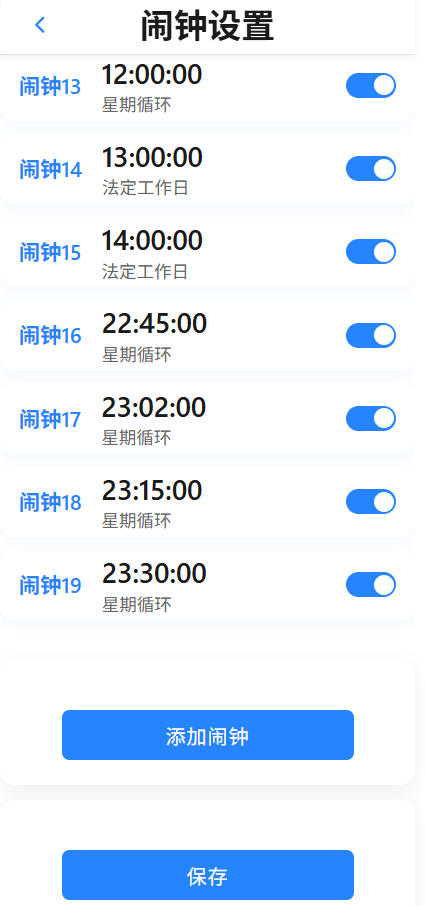
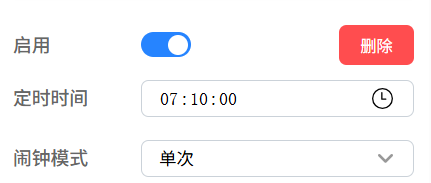
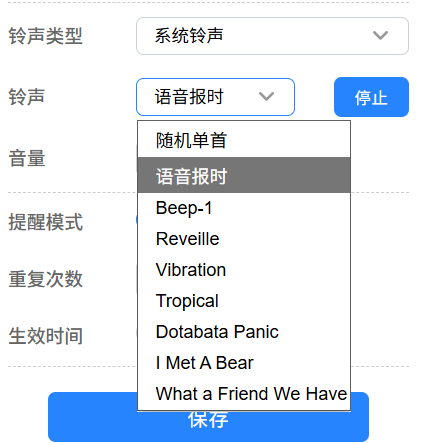
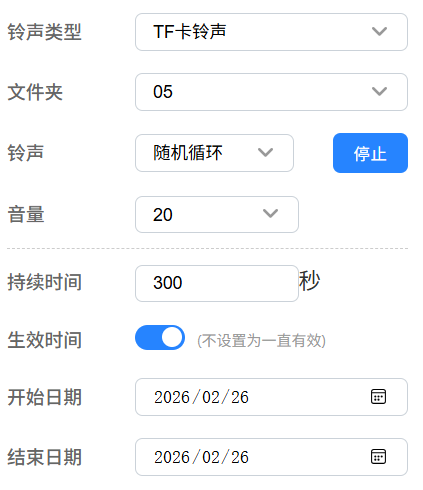
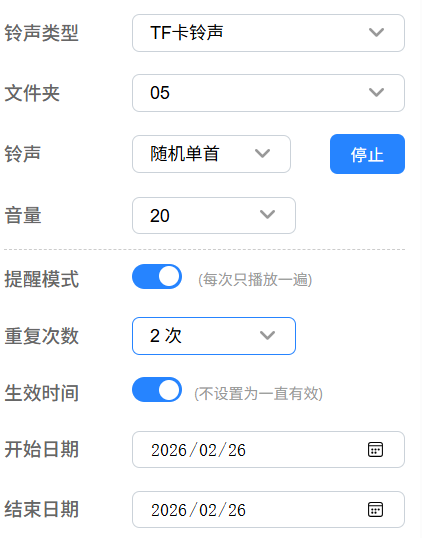
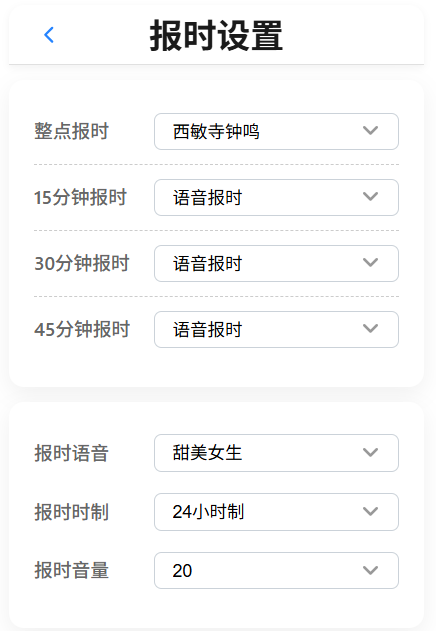
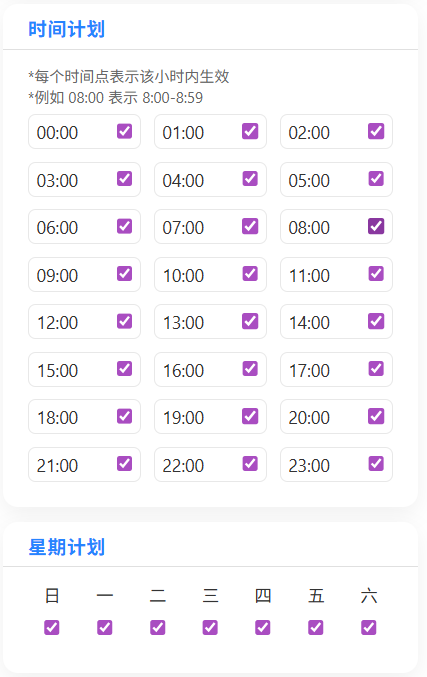
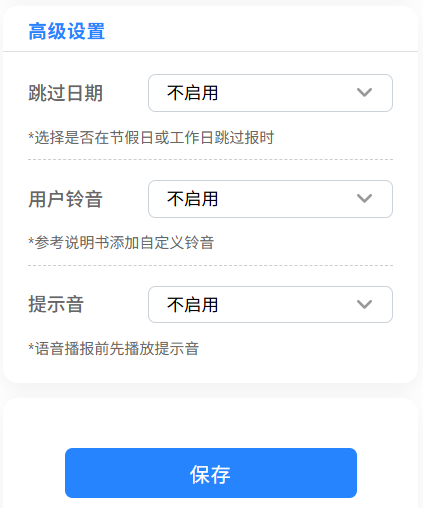
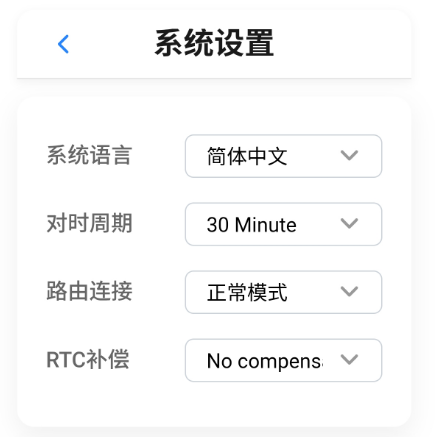
Detailed Explanation of Selected Settings
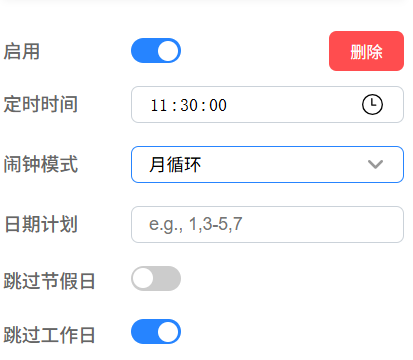
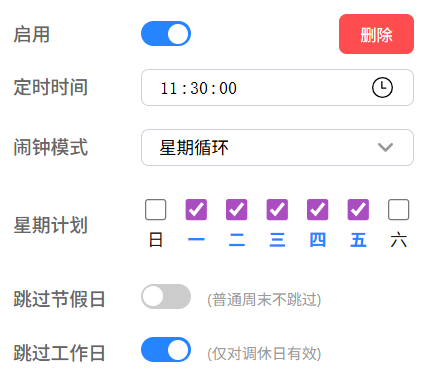
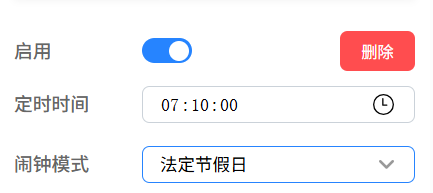
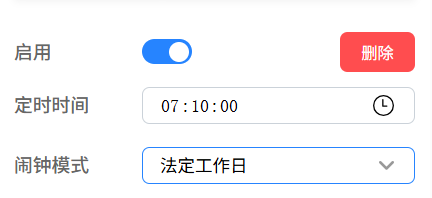
Most settings can be understood directly from the UI. A few special items are explained in detail below together with the interface.
Note: due to software upgrades and optimization, some page displays may differ slightly.
Frequently Asked Questions
1. What timekeeping accuracy can be expected?
2. How can I tell whether network configuration succeeded?
3. At what time does synchronization occur?
4. The device cannot connect to the router
5. What is the difference between Normal Mode and Persistent Connection Mode for router connection?
6. If the vendor server is no longer maintained, will the device still work normally?
7. How do I restore factory settings?
8. How does the secure login feature work?
9. How should an external high-power amplifier be designed?
10. How should network configuration be performed, and how should the user guide be written?
Upgrade Notes
Automatic push upgrades are not provided for now. If an upgrade is needed, please operate it manually from the web page: [Tools] -> [Device Upgrade]
Revision History
-
1.0.x - 2026-02-26
Initial release
Reference Design - Music Alarm Clock Core Board
 Schematic
 Core board dimensions
 Complete PCB project in .epro2 format (designed with LCSC EDA)
-
Altium files (exported from LCSC EDA; .epro2 format is recommended for best accuracy)
-
PADS files (exported from LCSC EDA; .epro2 format is recommended for best accuracy)
 Core board 3D file (STEP format)
 User manual (basic content; see the webpage for details)_EN