


WHEN Series WiFi Clock: Professional-grade NTP Synchronization Software Released (Beta Users Wanted)
This update focuses on optimizing NTP time synchronization performance, redesigning the NTP client program in combination with processor characteristics, reducing jitter from over 40ms to within 2ms. The new client program accounts for most NTP protocol features and provides practical configuration options for users.
After upgrading to the new software version, the cost-performance ratio of the WHEN series WiFi clocks has significantly improved. At the price of a standard network clock, it delivers NTP time synchronization performance comparable to professional-grade equipment. For scenarios requiring high-precision time, there are very few digital display devices on the market offering equivalent high-precision network time synchronization, making the WHEN series WiFi clock an ideal choice.
Sources of Network Time Synchronization Errors
Most devices use NTP (Network Time Protocol) for time synchronization, which is currently the most common network time synchronization method, with numerous free public NTP servers available on the internet. We won’t delve into the detailed principles of the NTP protocol (abundant resources are available online) but focus on the three main sources of errors:
- Device Design:
The hardware performance and software optimization of the device directly affect time synchronization accuracy. - NTP Server Time Errors:
The accuracy of the server’s own time affects the synchronization results. - Network Latency:
When both the device and server are reliable, network latency is the primary source of errors.
The NTP protocol measures round-trip time (RTT) through multiple timestamp exchanges, assuming equal uplink and downlink delays, and uses half of the RTT as the one-way transmission time to correct the time. However, in real-world network environments, uplink and downlink delays are often asymmetric, leading to calculation deviations.
Therefore, higher network latency may result in larger time synchronization errors.
New Software Settings
The new software version provides users with more flexible configuration options for network time synchronization, optimizing NTP performance to meet diverse needs. Below are the new features:
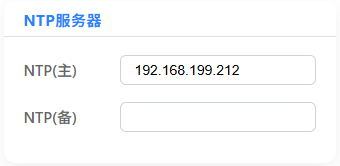
Users can set a primary server and a backup server. The system prioritizes the primary server and automatically switches to the backup server if the primary server fails multiple times, ensuring time synchronization stability.
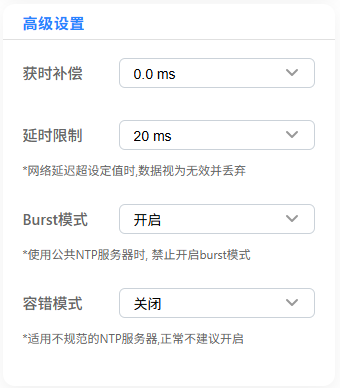
Provides fine-tuned control for advanced users, improving time synchronization accuracy and compatibility:
- Time Acquisition Compensation:
Allows fine-tuning of system time to compensate for known server time deviations or clock display delays, suitable for scenarios requiring extremely high precision. - Latency Limit:
Allows setting a network latency threshold; time data exceeding this threshold will be discarded, effectively filtering high-error data caused by network fluctuations. - Burst Mode:
An NTP high-precision time synchronization mode, recommended for use with private servers to significantly improve accuracy.
Note: Disable this mode when using public servers to avoid being blacklisted. - Fault-Tolerance Mode:
Strictly validates the reliability and standardization of data sent by the server. When enabled, non-standard parameters are ignored, improving compatibility with private servers, suitable for users with non-standard NTP servers.
Accuracy Test Data
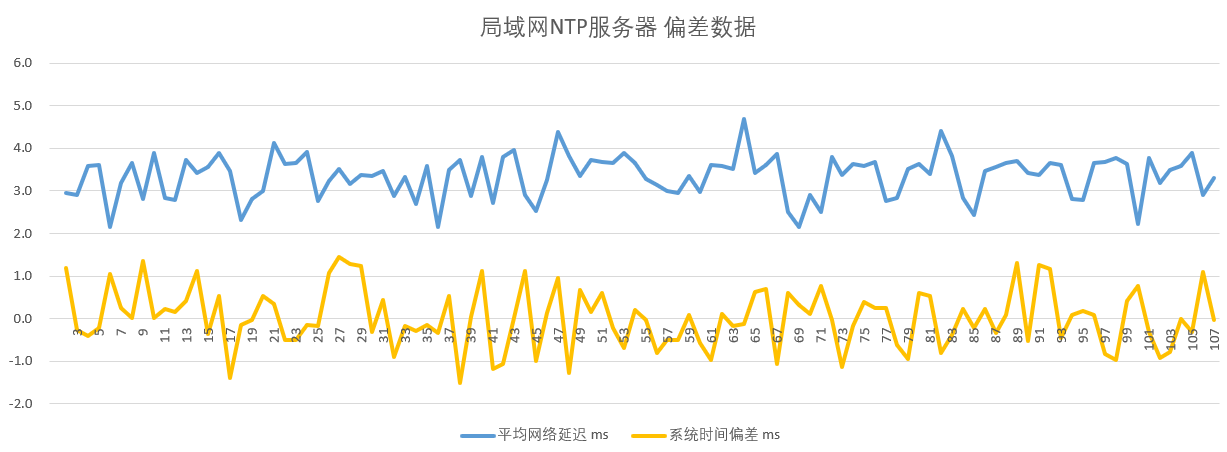
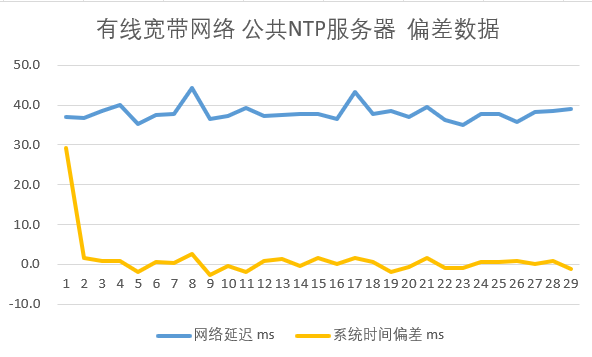
It should be emphasized that NTP time synchronization accuracy is highly dependent on network latency.
Local NTP Server, Burst Mode Enabled, Synchronization Interval 1 Minute
Public NTP Server, Burst Mode Disabled, Synchronization Interval 1 Minute (Wired Broadband)
Public NTP Server, Burst Mode Disabled, Synchronization Interval 1 Minute (Mobile Network)
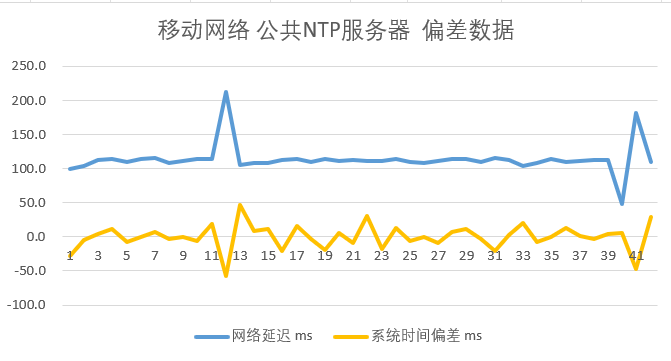
The first three tests were conducted internally, recording the deviation between system time and server time. Test 4 was conducted by other professional users in a local network environment, using a GNSS standard time source to compare standard time with the actual display time on the screen, with results as follows:
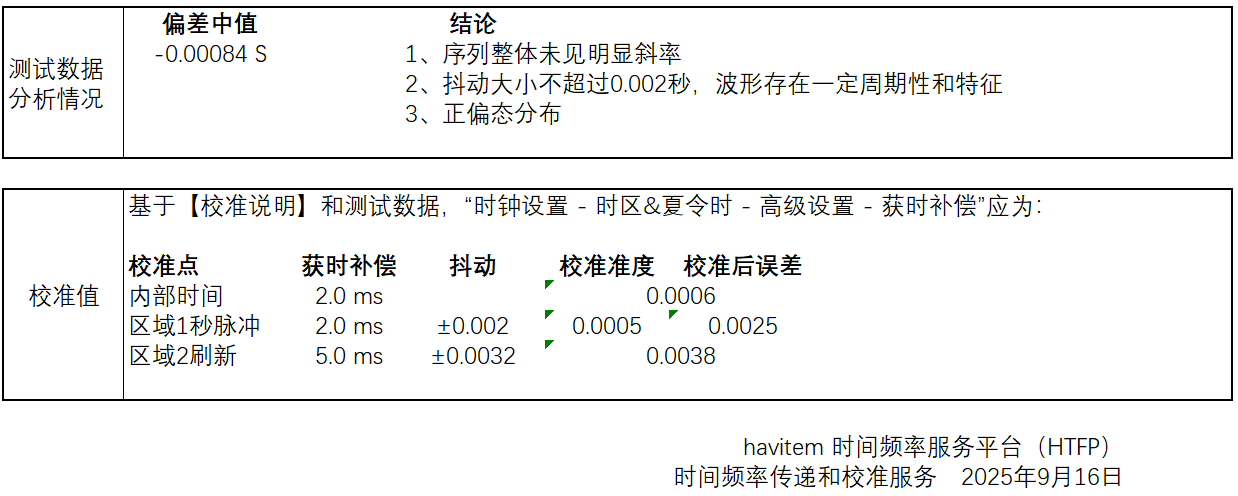
- Time Announcement/Alarm Scenarios: Prioritize the accuracy of time announcements or alarms, set “Time Acquisition Compensation” to 0.
- Display Accuracy Scenarios: Set “Time Acquisition Compensation” to 2~4ms to compensate for display delay.
Beta Testing Notes
Software Stability
Target Users
· The current version’s accuracy already surpasses most similar clocks on the market. Regular users can continue using the current version and wait for the official release after beta testing (free upgrade).
Accuracy Verification Methods
- Do not use mobile phones or computer time as a reference (insufficient accuracy). Professional equipment (e.g., GNSS time source) is recommended.
- Quickly press the red button 4 times to enable the screen pulse flashing test mode, facilitating millisecond-level accuracy verification.
Multi-Device Testing
Network Latency Display
Recommended Settings
- Public NTP Servers: Enable “Latency Limit,” disable “Burst Mode” (to avoid being blacklisted), and set the synchronization interval to 5 minutes.
- Private NTP Servers: Enable “Latency Limit,” enable “Burst Mode,” and set the synchronization interval to 1 minute.
Parameter Initialization
Beta Version and Participation
Beta Participation: Please send the clock’s serial number to us via email, and we will provide the beta firmware and upgrade guide.
Email: junhui.gong@outlook.com.
Statement on Accuracy
We often encounter users requesting precise error data, expecting 24/7 “zero error” with standard time, or asking us to guarantee “no deviation whatsoever.”
We cannot promise “absolute precision,” “zero error,” or “no deviation whatsoever,” nor do we promote such claims.
The test data above are based on specific conditions, and NTP time synchronization accuracy is affected by factors such as network latency and server quality, which cannot be eliminated by a single terminal device.
Acknowledgments
We sincerely thank havitem for their strong support and professional guidance in this software update!
As a senior scholar in the field of time and synchronization, havitem’s in-depth research provided critical assistance for this update. We encourage everyone to explore their published articles on time synchronization to learn more about the intricacies of time synchronization. Thank you again!